

Search & filters
Two search surfaces cover most needs: the search box in the top bar, which searches the whole company, and the board toolbar, which narrows one project’s tickets.
Company-wide search
Type at least two characters into the top-bar search and press Enter to open /search?q=. From a project page the same search is scoped to that project at /projects/:id/search.
Search matches:
- Ticket titles.
- Ticket descriptions.
- Comment bodies, from people and from AI agents.
- The source URL.
It does not search annotation text, network response bodies, or console arguments.
Results are the 50 best matches, each showing the ticket id, when it was created, its source URL, and an AI activity marker when an agent has commented. Results only include tickets in projects you can access, and archived tickets are left out unless you ask for them in advanced search.
Advanced search
The Advanced search button (on the board and in the inbox) opens the full form:
| Field | What it does |
|---|---|
| Query | Free text, at least two characters. |
| Match in | Any combination of Title, Description, User comments, AI comments, Source URL. The default is all five. |
| Author | Tickets created by the chosen members. |
| Assignee | Tickets with at least one of the chosen members assigned. |
| Created | Inclusive date range on creation. |
| Updated | Inclusive date range on last update. |
| Annotated | Only tickets with at least one drawn annotation, only tickets without, or both. |
| Status | Resolved, unresolved, or all. |
| Include archived | Off by default. |
Splitting User comments from AI comments lets you ask “did I say this” separately from “did the agent say this”.
Board quick filters
The board toolbar has a search box that filters the visible tickets as you type, plus quick chips:
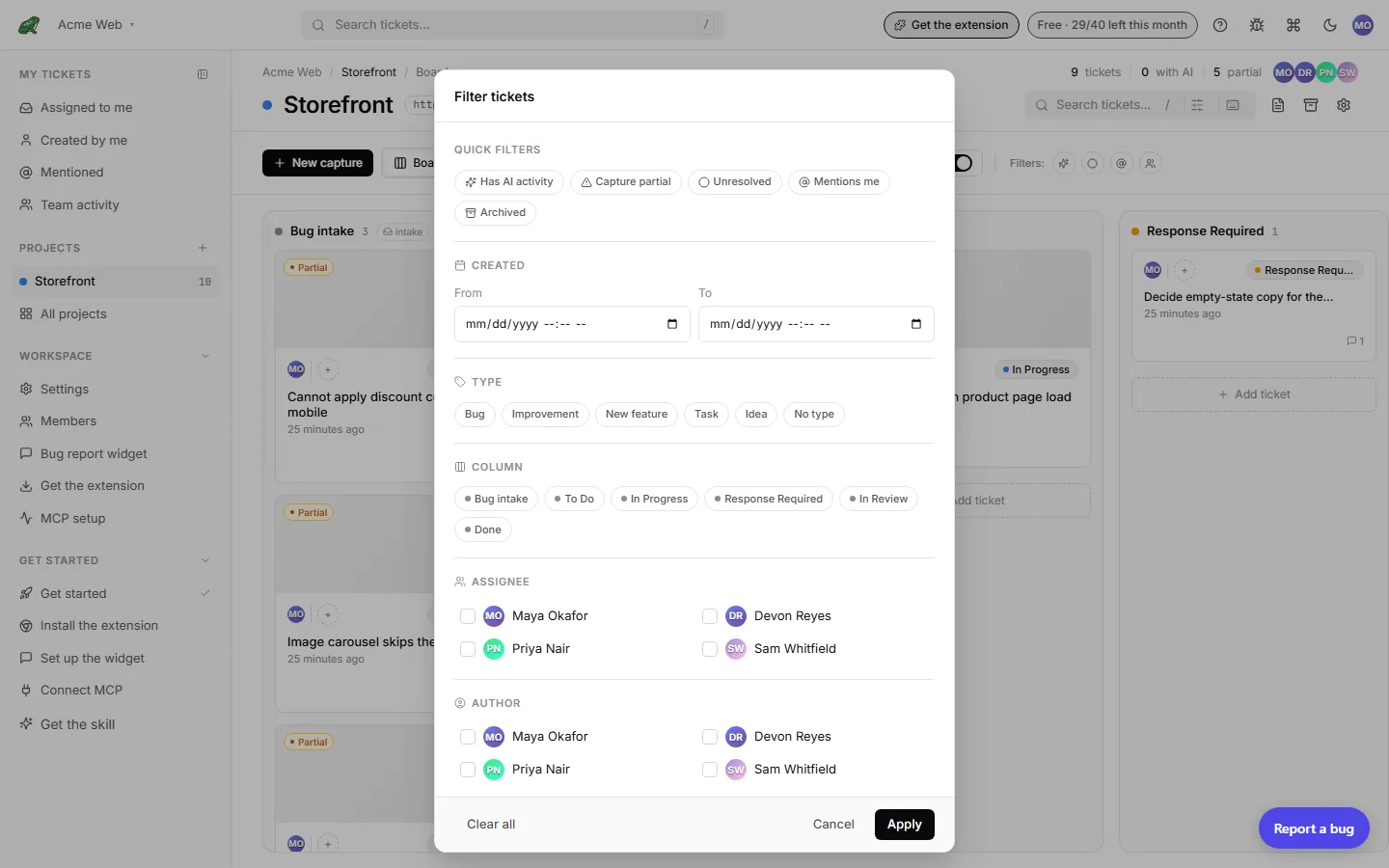
- Has AI activity: an agent has commented on the ticket.
- Capture partial: the capture came back incomplete.
- Unresolved: the resolved flag is off.
- Mentions me: you are @-mentioned in the description or a comment.
- From customers: only widget and report-link tickets. Use it to work the customer-report queue; it combines with the other filters and with column, assignee, author, and date filters.
The Filter button opens the full filter with Archived, assignees, authors, columns, and a created-date range. Filter and sort choices are saved per project per user.
There is no separate filter by source beyond From customers. Tickets from the extension, walkthroughs, MCP, and manual entry are identified by the badge on the card and on the ticket page.
Where to next
search_ticketsMCP tool for the same surface from AI agents.- Board for the per-project view.
- Inbox for your tickets across projects.
- Reference › Keyboard shortcuts.