

Companies & projects
Toado’s data model is intentionally small. Five concepts cover everything: user, company, project, column, ticket.
The model
user (you) ├── member of company A │ ├── project A1 │ │ ├── column "To Do" │ │ │ ├── ticket │ │ │ ├── ticket │ │ ├── column "In Progress" │ │ ├── column "Response Required" │ │ ├── column "In Review" │ │ ├── column "Done" │ ├── project A2 ├── member of company B ├── project B1A user can belong to many companies. A company contains many projects. A project has its own kanban board with columns. Tickets live in columns and are scoped to a project.
User
The account you sign in with. One email, one user. A user can:
- Be a member of multiple companies.
- Have different roles in each company.
- Create personal API tokens that are scoped to specific companies or projects.
Your settings (/me/settings) has these tabs: Profile (name, email, photo, and the theme), Notifications, Extension, MCP Connector, API tokens, Privacy (product telemetry), and Sessions (every browser and extension signed in as you, with sign-out).
Company
The top-level container for almost everything: members, projects, billing, settings, role assignments.
Common patterns:
- Solo dev: one company called your name or your business.
- Agency: one company per client, plus an internal company for your own projects.
- Startup: one company for the whole org, multiple projects (web app, marketing site, mobile, etc.).
- Multi-product: one company per product line.
You can be in as many companies as you want. Switching companies in the UI is one click in the top nav.
Company settings
Company settings (/company/settings) has these tabs. Two are visible to owners only.
| Tab | What it holds |
|---|---|
| General | Company identity and basic settings. |
| Members | Who has access and what they can do. See Roles & permissions. |
| Bug report widget (owner) | Every project’s widget at a glance. See Bug report widget. |
| Billing | Plan and seats. Only the owner can change the plan. |
| Extension | Install the extension and connect it to your account. |
| MCP Connector | Connect Claude Code and other MCP clients. |
| Pre-built skill | Drop-in workflows for Claude Code. |
| MCP tokens | Personal access tokens for MCP clients. See API tokens. |
| Capture profiles | Per-origin rules for what the extension captures and redacts. See Capture profiles. |
| Archival | The company default for automatic archival. See Archive & restore. |
| AI | The workspace’s AI features, today the Auto-generate ticket titles toggle. On for a new workspace; an owner can turn it off, which stops every AI feature at once, titles and walkthrough write-ups included. Owner-only to change; everyone else sees the state read-only. |
| Jira (owner) | Connect the workspace to Jira Cloud. See Jira export. |
| Audit log | Admin-visible actions across the company. See Audit log. |
Project
A kanban board, scoped to a company. A project has a name, a description, a colour, URL patterns, a column set, tickets, and per-project settings.
Tickets cannot move across companies, but they can move across projects within the same company. See Archive & restore › Cross-project moves.
Project settings
Project settings (/projects/:id/settings) is split into small tabs. The Extension and Widget groups are indented under their headings.
| Tab | What it holds |
|---|---|
| General | Name, description, and colour. |
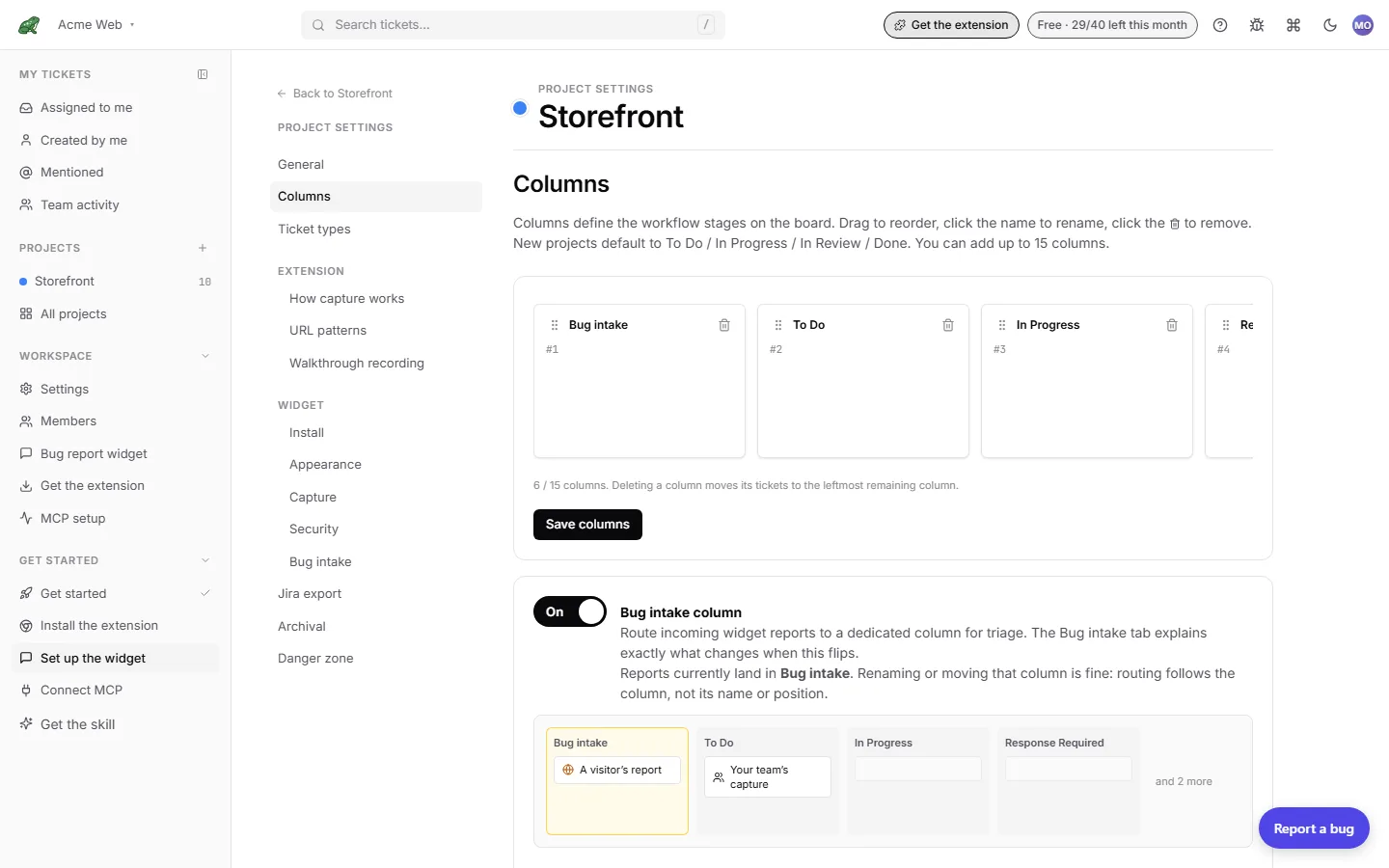
| Columns | Reorder, rename, add, and remove columns (up to 15), plus the Bug intake column checkbox. |
| Extension › How capture works | An explainer: two ways to capture, what comes with a capture, how a capture reaches this project, and which settings are personal rather than the project’s. Links to the extension download and to capture profiles. |
| Extension › URL patterns | Which page addresses file captures into this project. See below. |
| Extension › Walkthrough recording | What a walkthrough of this project records. |
| Widget › Install | The one-line snippet and allowed sites. |
| Widget › Appearance | Colours, position, and copy. See Widget appearance. |
| Widget › Capture | What a widget report includes. See Widget capture. |
| Widget › Security | Origins, rate limits, and reporter data. See Widget security. |
| Widget › Bug intake | Route widget and report-link submissions to a holding column. See Bug intake. |
| Jira export (owner) | Map this project to a Jira project and issue type. See Jira export. |
| Archival | Per-project override of the company archival policy. |
| Danger zone | Delete the project. Deleting a project is permanent and removes all tickets and captures. |
The Widget tabs and Jira export are visible to owners only.
URL patterns
URL patterns tell Toado which project to file a capture into based on the page address. When a capture’s source URL matches a pattern, it lands in this project without being asked, and the pins panel opens on its own on that page. Patterns are only used for routing: they are not a permission or an allowlist, and they are unrelated to the widget’s allowed-sites list.
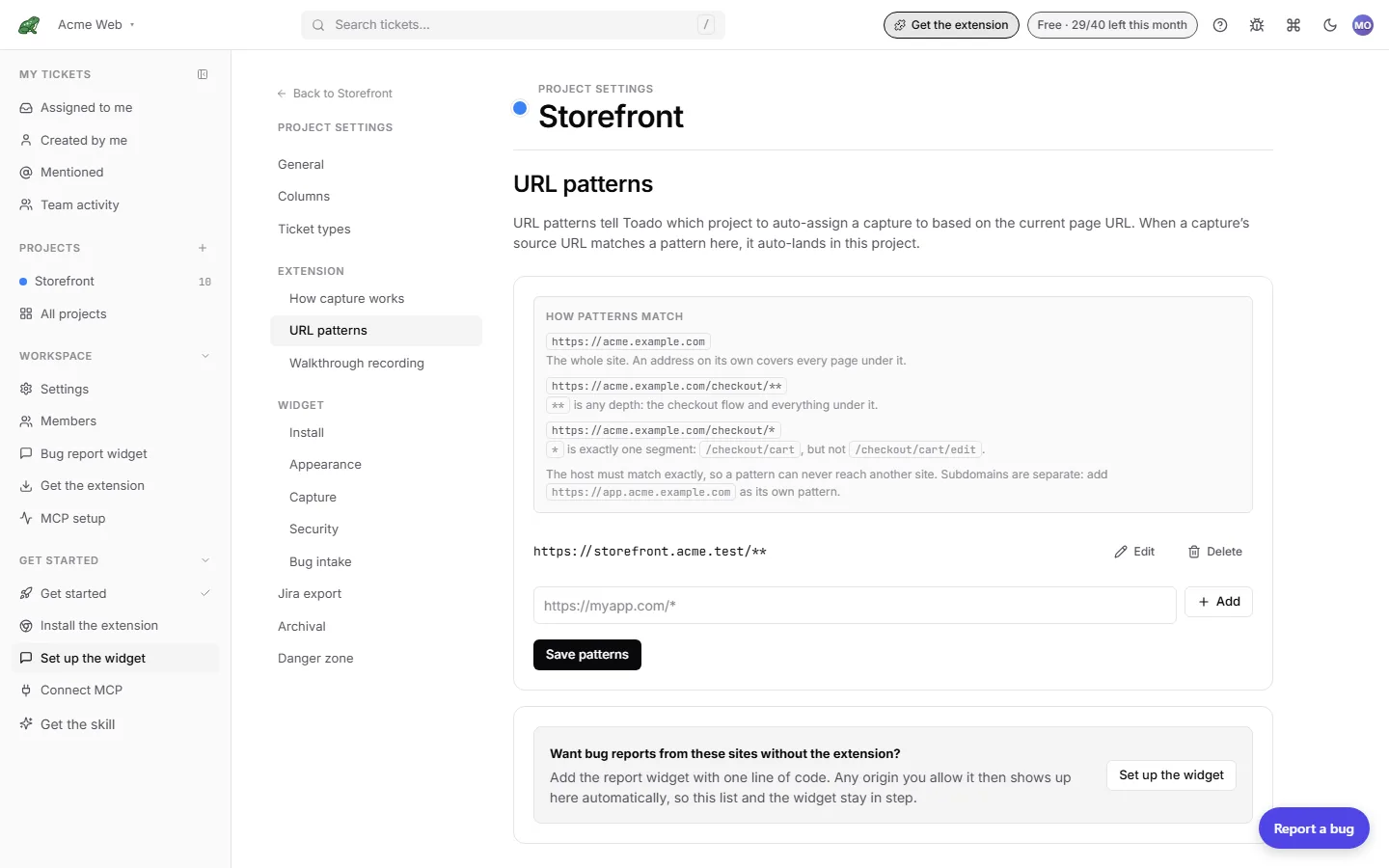
How a pattern matches:
| Pattern | Matches |
|---|---|
https://acme.example.com | The whole site. An address on its own covers every page under it. |
https://acme.example.com/checkout/** | ** is any depth: the checkout flow and everything under it. |
https://acme.example.com/checkout/* | * is exactly one segment: /checkout/cart, but not /checkout/cart/edit. |
The host must match exactly, so a pattern can never reach another site. Subdomains are separate: add https://app.acme.example.com as its own pattern.
When several projects match the same page:
- Your own workspace wins before specificity does. The extension searches the workspace of the project you filed into last before any other, so a match there beats a closer pattern in a different workspace. This is deliberate: without it, an admin of another workspace adding your site to one of their projects would quietly pull your captures into their workspace and under their capture rules.
- The most specific pattern wins. Specificity is about how much the pattern demands of the URL, not its raw length:
/docs/*beats/docs/**, and a bare origin is the least specific of all. - A tie prefers a project already in play, one the page’s pins file into or the one you used last. If neither applies, two tied projects in the same workspace resolve stably to one of them, and a tie across workspaces resolves to nothing, so the capture falls back as it would with no match. If two projects claim identical patterns, split them rather than relying on any of this.
- Duplicates collapse on save. Patterns are normalized (adjacent
**segments merge, trailing slashes drop), and two entries that normalize to the same thing are stored once.
Add a pattern in the field at the bottom, press Add, then Save patterns. Owners also see a nudge to Set up the widget, since origins the widget allows show up here automatically.
Column
A vertical lane on the kanban board. New projects get five: To Do, In Progress, Response Required, In Review, Done. Projects that collect outside reports can add an optional Bug intake column at the left. See The board › Columns.
There is no enforced workflow. Any column can move to any other column.
Ticket
A captured bug, feature request, or piece of work. A ticket has:
- A title (often AI-generated from the capture; editable).
- A description (markdown; on a walkthrough ticket, the interpretation with the transcript underneath).
- A source (extension, widget, report link, team snippet, AI agent, manual, walkthrough) and a capture mode.
- A capture payload (screenshot, console, network, errors, performance, and a walkthrough clip where there is one).
- On a pin, the element block and page identity.
- Annotations (overlay shapes drawn on the screenshot).
- Comments.
- Attachments (extra images uploaded by the user).
- Assignees.
- A column.
- A resolved flag (separate from column).
- An optional branch name.
- Jira export state once exported.
- Standard timestamps (created, updated, archived).
Tickets are immutable in identity (the id is permanent) but every field above is editable. See Ticket detail.
What is not in the model (yet)
These are out of scope today and may show up later:
- Tags / labels on tickets.
- Sub-tickets or task hierarchies.
- Sprints / milestones / iterations.
- Time tracking.
- Custom fields per project.
- Workflow rules (e.g. “moving to Done requires approval”).
If any of these matter to you, the feature request page is the place to vote.
Multi-tenancy
A user only sees companies they are a member of. Tokens can be restricted further (to specific companies or projects). The data model enforces multi-tenancy from day one; there is no “all-companies” view that would leak data across tenants.
Where to next
- Invitations, how to add teammates.
- Roles & permissions, what each role can do.
- Capture profiles, company-wide capture and redaction rules.
- Bug intake, the holding column for outside reports.