

API tokens
API tokens are how anything outside the web app authenticates to Toado: the MCP server, direct REST calls, custom integrations, CI scripts.
This page covers tokens from an end-user perspective. For the AI agent perspective with the full scope matrix, see Tokens & scopes (Claude Code).
Creating a token
Company settings > MCP tokens > Create token.
Tokens are created in the web app under Company settings › MCP tokens › Create token. Pick a label, choose scopes, and optionally restrict to specific companies or projects. The token string is shown once at creation time and cannot be retrieved later, so save it immediately.
mcp.read. Choose mutation scopes as needed. Jira sending requires a separate explicit mcp.jira.send grant.
Tokens begin with vd_live_ or vd_test_. Treat them like passwords.
Revoke at any time from the same settings page; revocation is effective immediately.
Pick a label, choose scopes, optionally restrict to specific companies or projects, click Create token. The token string is shown once. Copy it immediately; you cannot retrieve it later.
What scopes do
Five independent MCP permissions:
- mcp.read: read accessible tickets, captures, comments, DevTools, walkthrough frames, and report evidence.
- mcp.comments: post comments.
- mcp.tickets.write: create, edit, move, archive, restore, record fixes and branches, and unlink Jira issues. Duplicate handling and reporter questions also need comments.
- mcp.tickets.assign: change assignees.
- mcp.jira.send: send to Jira, explicitly opted in. This is not included in the default full-access grant.
Read access accompanies every grant. Mutation scopes do not automatically grant one another. Workspace plan and project restrictions still apply.
Pick the narrowest set that fits the use case.
| Use case | Recommended scopes |
|---|---|
| Claude Code triage agent | mcp.read, mcp.comments, mcp.tickets.write, mcp.tickets.assign |
| Read-only reporting / dashboards | mcp.read |
| Slack bot that posts comments | mcp.read, mcp.comments |
| External system that updates ticket status | mcp.read, mcp.comments, mcp.tickets.write |
| Per-project agent with no assignment power | mcp.read, mcp.comments, mcp.tickets.write |
Restricting a token
When creating, you can restrict the token to:
- One or more companies.
- One or more projects within those companies.
A restricted token sees only the chosen scope. Listing operations return only matching rows; writes against other rows return forbidden.
Use restrictions when:
- The token is for a skill that should only touch one project.
- You are running Toado as a managed service for clients and want one token per client.
- You want to embed a token in CI and minimize blast radius.
Where to put the token
| Context | Where |
|---|---|
| Claude Code via MCP | TOADO_API_TOKEN env var, set in your MCP config. See Installation. |
| Direct REST | Authorization: Bearer vd_live_example header. |
| Local dev | .env file, ignored by git. |
| CI | Your CI’s secrets manager (GitHub Actions secrets, etc.). |
| Production app | Your platform’s secret manager (Vercel env vars, etc.). |
Rotating
Two safe patterns:
- Side-by-side: create the new token, update your config, restart, then revoke the old.
- Cut-over: revoke the old, create the new, update config. Faster but every in-flight call from the old token is rejected immediately.
Revocation is effective immediately. The next request with a revoked token returns 401.
Visibility into what tokens did
Every write operation records the token id, the token label, and the token owner on the resulting row. In the UI:
- Comments show:
Jason (claude-code on macbook) · via MCP. - Ticket edit history (when ticket history is shipped) will show the same.
This makes it easy to audit what each token has been doing.
Limits
- No hard cap on number of tokens per user (within reason).
- Per-token rate limits: 600 reads / minute, 60 writes / minute (configurable per company).
- Revoked tokens count against no quota.
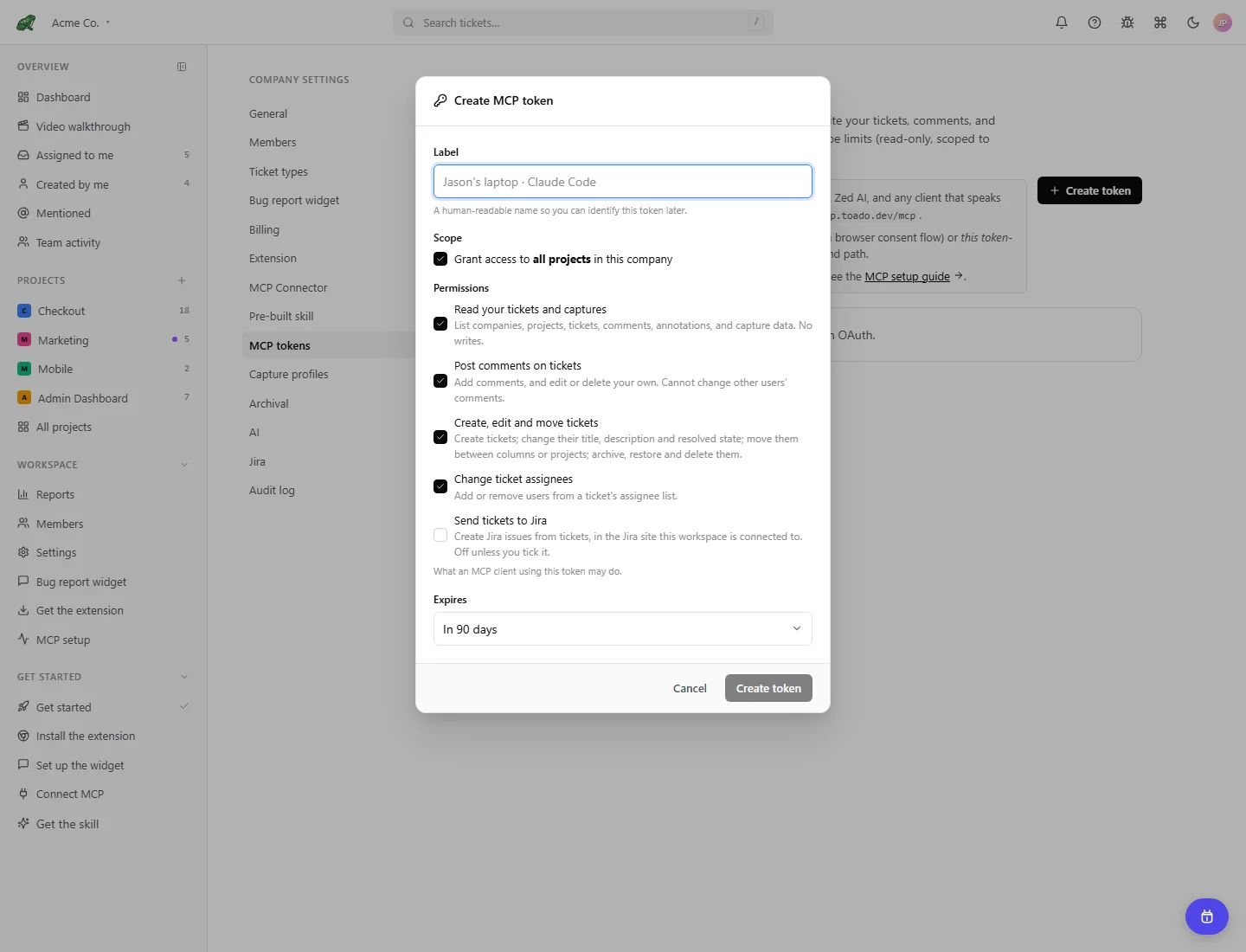
Local demonstration data. No token was generated for this screenshot.
Where to next
- Tokens & scopes (Claude Code) for the agent-perspective deep dive.
- Tools reference for what each MCP tool requires.
- Roles & permissions since token capability is bounded by the owner’s role.