

Options and settings
Open Chrome’s extension menu for Toado and choose Options. This page controls the extension connection and personal preferences. Project routing and workspace capture policy are configured in the web app.
Connection and account
Use Connect to Toado to authorize the extension through your account. OAuth handles the connection without copying a token. The connection section also exposes the API and app addresses for custom backends. Confirm the destination before saving: captured page content and the access token go to the configured API.
Advanced manual-token setup is for compatible custom configurations. An AI-tool token is not automatically a token that can submit extension captures. Prefer the connection flow unless you administer that backend.
Disconnect or Sign out removes the connection. Sign in again before submitting more captures.
Redaction
Add extra header names to scrub before capture data leaves the browser. These are combined with built-in rules and workspace capture profiles. The help explains these layers and the treatment of sensitive JSON body keys and URL fragments.
These controls do not remove sensitive pixels from screenshots or speech from audio. Do not rely on a nonexistent pre-upload screenshot review setting. Avoid capturing sensitive content and use a Never capture profile for restricted pages.
In-page logging
Use Alt+C to place a pin and create an issue on the current page chooses what the primary shortcut does:
- On: arm page pinning and open the composer after an element is selected.
- Off: perform classic capture.
The popup’s Capture action remains available in either case. An upgraded installation can retain a different preference from a fresh install, so check this toggle if the shortcut behaves differently than expected.
Walkthrough recording
Choose Screen and narration or Narration only. A project can require its own recording mode instead of each person’s preference. Narration only still captures screenshots when you pin an element.
See Walkthrough recording for microphone and screen permissions, review, and media retention.
Keyboard shortcuts
Chrome owns the configurable bindings. Open chrome://extensions/shortcuts to change Toado’s primary action (default Alt+C) and Open popup (default Alt+B).
During a walkthrough, Alt+click marks an element and starts the next ticket moment; Alt+N starts a ticket without an element. These are in-page recorder controls, rather than separate Chrome command assignments.
Diagnostics
The Diagnostics section can copy an extension diagnostics report for troubleshooting. It does not send anything automatically. Inspect what you copy before sharing it with support.
Page and workspace controls
Marker style and colour, transparency, and per-site deep network capture are in the page-pins control. Project URL patterns route sites to projects. Workspace owners manage capture restrictions in Capture profiles.
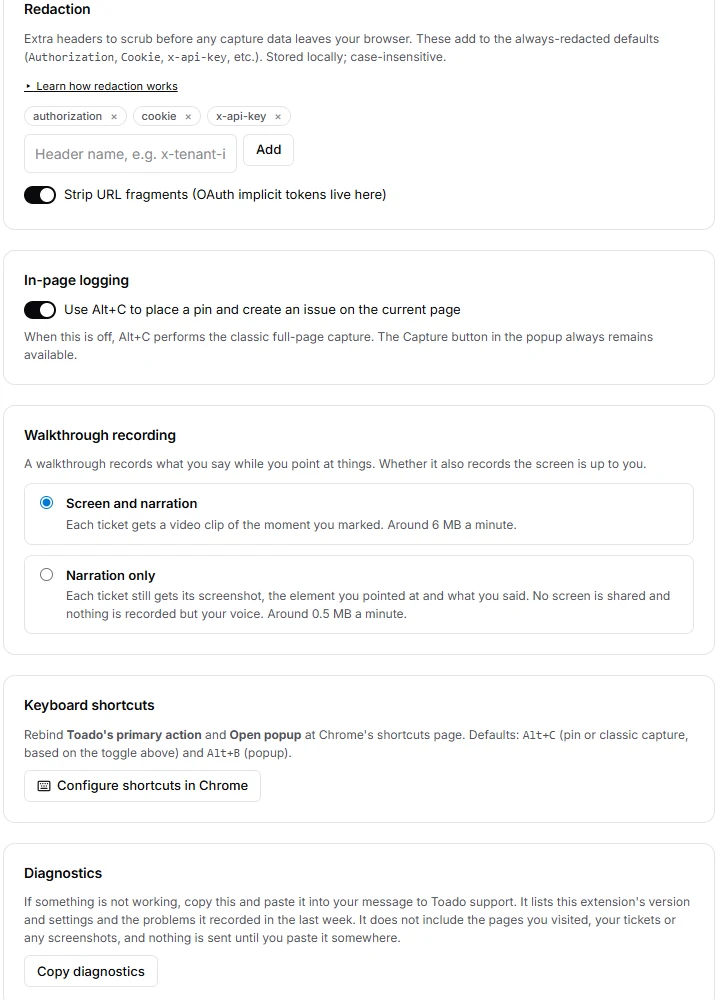
Actual extension Options page connected to a local test account.
Where to next
- Page pins, customize and use the in-page control.
- Permissions and privacy, understand captured data.
- Troubleshooting, resolve connection or capture problems.